Show. Don't Tell.

Product demos as code, built for your coding agent. One instruction, create a product demo of my site, and Claude Code, Codex or Antigravity writes two text files in your repo and compiles them into video, guide, reel and tour, in every locale, auditing its own work. You review the diff and tweak details; the demo regenerates whenever the UI changes.

free and open source·no account, no API key·Node 20+·ffmpeg bundled
the ask · paste into Claude Code, Codex or Antigravity
Create a product demo of my site.
Use the CLI to generate everything.

The agent finds its manual (AGENTS.md) in the repo and runs everything locally: nothing to sign up for, no key to paste. Prefer to drive? The commands are below.

One-time setup: Node 20.6+, then npm install and npx playwright install chromium (the recording engine — npm install alone won't fetch it). ffmpeg is bundled; no API key.

THIS CLIP IS VISTARO OUTPUT · GENERATED AND EMBEDDED BY THE CLI ITSELF
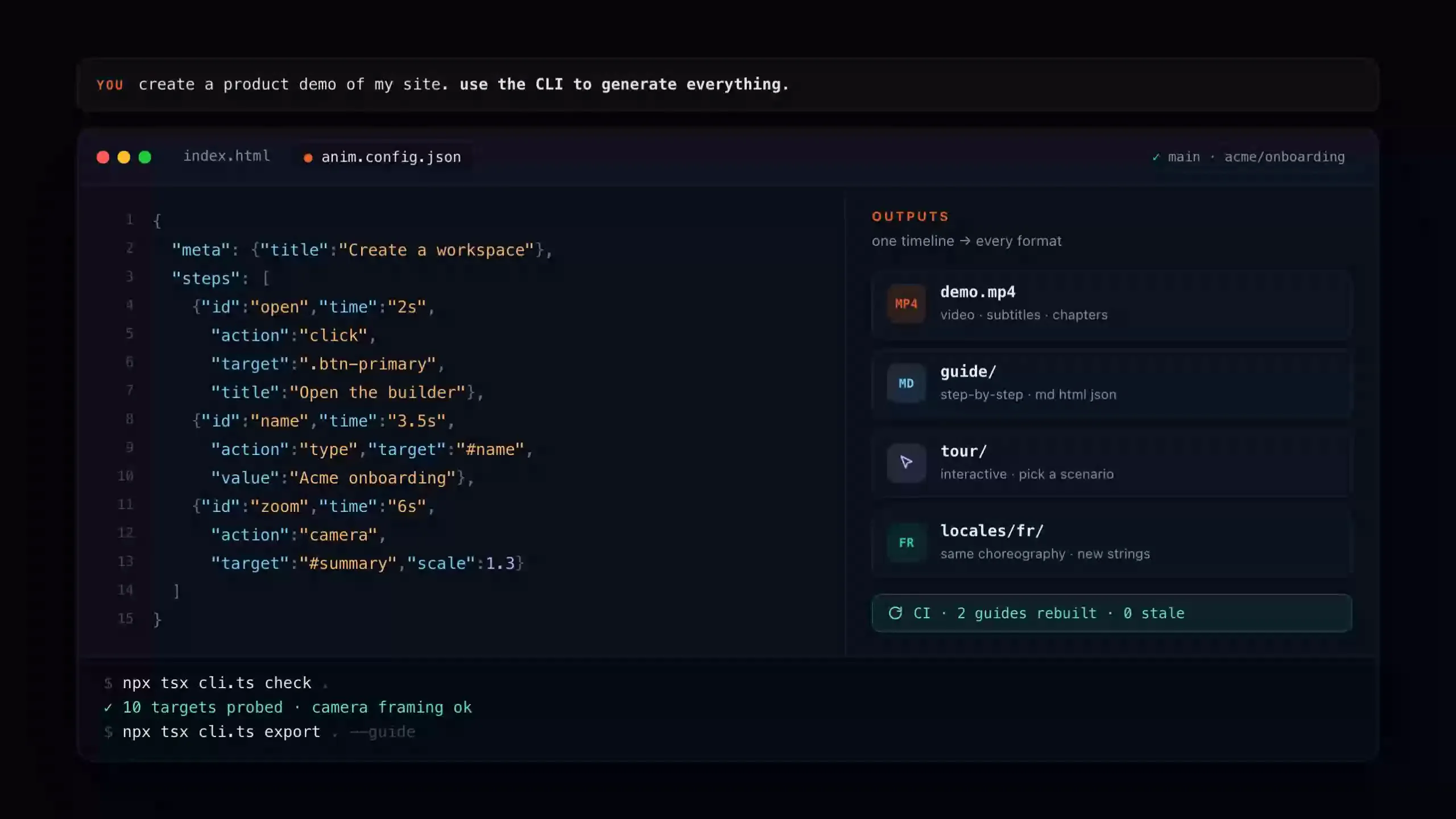
The reel's payoff frame: the prompt that started it, the Vistaro timeline and the artifacts it compiled
WATCH THE CLIP · 8 s · MP4

One timeline, website/src/reel/anim.config.json in this repo, compiled by npx tsx cli.ts export to the MP4 above, a WebM, a poster and a GIF in one pass.

You describe the demo. Your agent builds it.

The manual an agent needs ships in the repo as AGENTS.md, written for LLMs rather than adapted for them, and every command speaks plain text, JSON and PNGs. Point Claude Code, Codex or Antigravity at the project and ask.

you → your agent
Create a product demo
of my site. Use the CLI
to generate everything.
what the agent runs
$ npx tsx cli.ts init-config demo
$ npx tsx cli.ts check demo      # probes every target
$ npx tsx cli.ts preview demo    # reads the frames
$ npx tsx cli.ts export demo -o demo.mp4 --guide
$ npx tsx cli.ts verify demo     # build + audit
OK  demo.mp4 · demo.vtt · guide/ · verify.json

No API key, no metering: the LLM is yours, the CLI is local. The agent writes the screen and the timeline like any other code, checks its own work with check --json and verify.json, and fixes a badly aimed zoom like a lint finding. Your part is the part humans are good at: read the diff, tweak a time or a selector, approve.

Two text files in. Every demo artifact out.

A screen and a timeline: that is the whole source format. The compiler does the cursor, the spotlight, the camera, the subtitles, the guides and the locales.

STEP 1

Describe the screen and the timeline

index.html is the UI, anim.config.json is the choreography: clicks, typing, highlights, camera pushes, each with an explicit time. Your agent writes both and iterates on its own findings; you tweak a time or a selector like any other code change. Reviewable in a pull request, draftable from a real flow with record --learn. This timeline is real repo content:

anim.config.json
{ "meta": { "title":
    "Draft a proposal response" },
  "steps": [
    { "id": "progress",
      "time": "2.2s",
      "action": "highlight",
      "target": ".section-count",
      "title": "Check what is left" },
    { "id": "draft", "time": "6.4s",
      "action": "type",
      "target": "#editor-type-target",
      "value": "We will ensure
        rigorous compliance…" },
    { "id": "zoom", "time": "9.6s",
      "action": "camera",
      "target": "#text-editor",
      "scale": 1.18 } ] }
STEP 2

Let the CLI check its own work

check replays the timeline in a headless browser and probes every target right before its step (missing, hidden, 0×0, clipped, off-screen), then reports each camera push's framing as facts. A coding agent fixes a badly aimed zoom like any other lint finding. Real output from this repo:

terminal
$ npx tsx cli.ts check demo
· step 5 (6.4s type): target is 0x0
  (empty caret); the spotlight uses its
  sized ancestor #text-editor
· step 6 (9.6s camera): scale 1.18 ·
  window 1627x915 · target 100% visible
OK  9 steps · 0 errors · 1 warning · 3 info
STEP 3

Compile every output from the same source

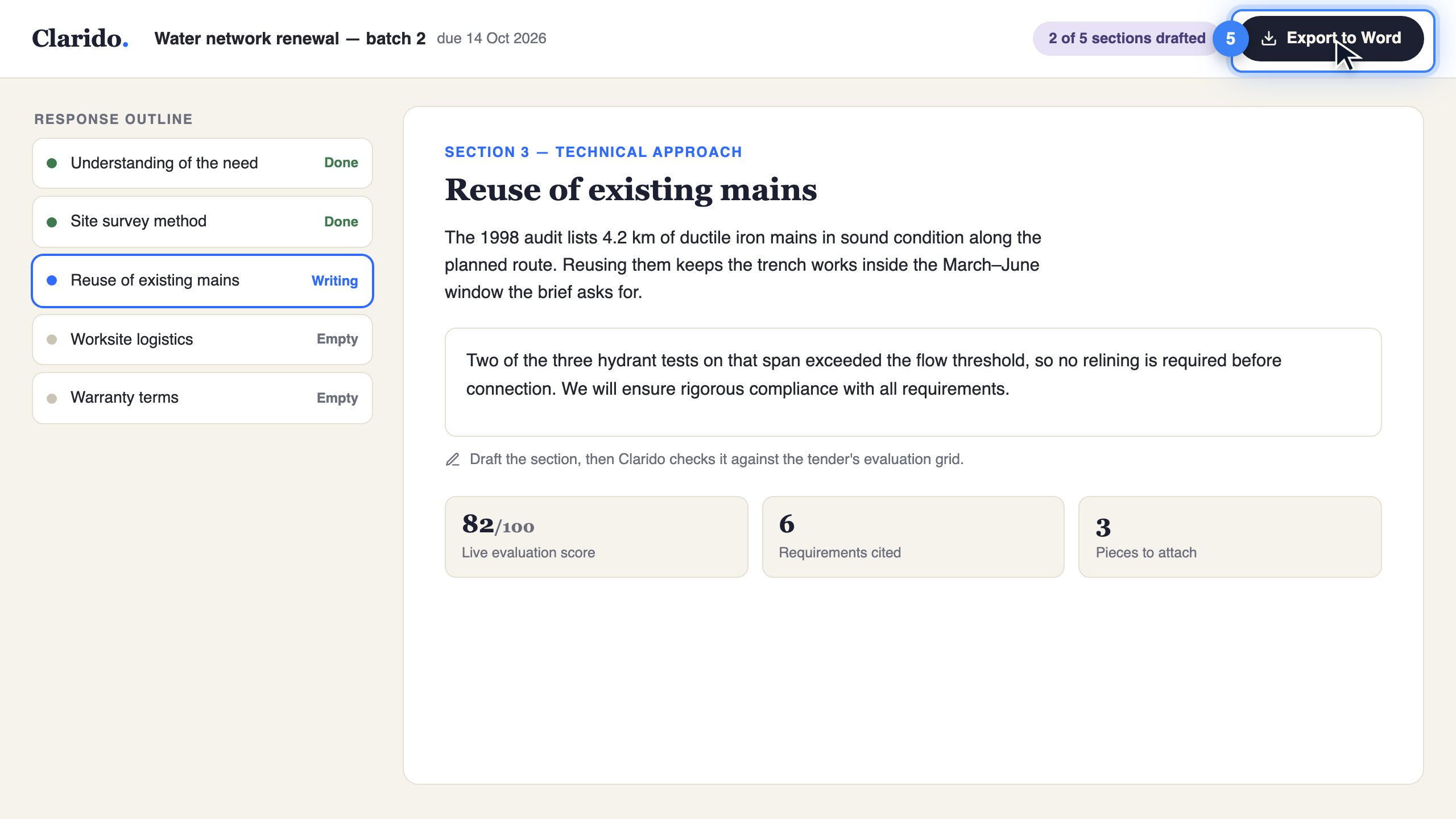
One command records the video with subtitles and chapters and captures the step guide. Same timeline, other commands: a tour site, a looping reel, a French build. The frame below is a captured guide step, untouched:

terminal
$ npx tsx cli.ts export . -o demo.mp4 --guide
$ npx tsx cli.ts build . --embed
$ npx tsx cli.ts tour
$ npx tsx cli.ts localize . fr
$ npx tsx cli.ts build-all --changed-only --diff
# every command prints what it wrote
demo/guide/assets/step-08.png · a real captured guide frame
A guide step frame captured by Vistaro: the Clarido app with a spotlight ring and numbered badge on the Export button

Your agent can review the demo, so you don't have to watch it.

Motion is auditable as text and images. The whole review surface (target probes, camera framing, overlay geometry, frame diffs) is JSON and PNGs a coding agent, or a tired human, can read without pressing play.

  • Build and audit in one command: export, filmstrip and a structured verify.json (per-step timings, issues), exit 1 on any failure. The one an agent runs.
  • Issues as structured data: every probe and camera-framing fact, ready for a bot to act on.
  • Per-step overlay geometry: cursor point, spotlight box, subtitle chip and camera window in authored px.
  • A real playback pass, sampled: mid-travel framing, cursor glide and typing as they actually play.
  • The encode-level check: the MP4 as a labelled strip plus what-moved-when-where facts, so unintended motion has nowhere to hide.
The first six frames of the demo video as a labelled contact strip: the cursor, the spotlight and a subtitle visible
demo/demo.strip.png · first 6 of 42 labelled frames; filmstrip demo.mp4 writes the whole clip as one strip

One timeline. Every artifact your product team keeps asking for.

Four content types from one source (demo videos, step-by-step guide sites, looping marketing reels and interactive tours), plus localization and CI-ready rebuilds (build-all --changed-only re-renders only what a change touched, in any CI you point at it). Every one a first-class compiler target, not a plugin, not an export hack, all in the free CLI.

Marketing reels

Silent looping product clips: MP4, WebM, poster and GIF in one export, plus a self-contained embed page that plays when scrolled into view. One responsive screen ships desktop and phone reels from the same source, at 2× pixel density. This page's hero is one.

Interactive tours

A self-contained tour site: a rail of scenarios and a canvas that plays them step by step, with play/pause and per-step seeking. Desktop and phone variants build from the same responsive mockup. Nothing is captured or encoded; it weighs what its HTML weighs.

Localization

The choreography is shared, so a French build is a strings file, not a re-shoot. Number and currency formats localize too ($2.4M becomes 2,4 M$), because a translated American product reads as one.

CI rebuilds

A content-hash build key per guide × locale. --changed-only rebuilds only what changed and --diff compares frames pixel by pixel, marking guides stale above the threshold.

Saved as code, so it reproduces.

Everything the agent writes is a small text artifact in your repository. The video is an output, never the source: review it in a pull request, rebuild it in CI, hand it to the next agent.

your repo
demo/
  index.html          the screen, authored once
  anim.config.json    the timeline: actions, targets, times
  strings.en.json     the base strings
  anim.manifest.json  each build: content hash + build key
  locales/fr/         the French build, same choreography
  guide/              captured step frames + crops
demo.mp4 + demo.vtt   regenerated by export, never edited
  • the PRA demo change reviews like code: the timeline diff says exactly what moved, when, and where the camera goes.
  • build keySources, media and settings, hashed: a rebuild that changes nothing is a no-op, so CI costs seconds.
  • Pixel-accurate staleness: the previous step frames are kept and compared; a stale guide is flagged, not discovered by a customer.

Free and open source. All of it.

No account, no credits, no watermark, no limits. Vistaro runs on your computer, driven by the agent you already use, and what it builds is yours: plain files you can commit, host or send.

Runs on your machine

Rendering happens on your laptop or in your CI. Nothing is uploaded anywhere, so a demo of a feature you haven't shipped stays with you.

Your agent does the work

Claude Code, Codex or Antigravity reads the manual in the repo and drives the CLI. There's no API key of ours to paste and no usage to pay for.

Yours to keep and share

Videos, guides, reels and tours are ordinary files. Review them in a pull request, drop them in Slack, or host them on GitHub Pages, Netlify or your docs site.

Maybe later

A hosted Vistaro, if you want one

We're considering an optional hosted service for what a laptop can't do: seeing how viewers move through a demo, collecting leads from it, a shared help center. The CLI stays free either way. If you'd use it, tell us what for.

Join the waitlist

Honest questions, straight answers.

How is this different from Arcade, Supademo, Storylane, Navattic, Scribe or Tango?
Those tools capture pixels, through a browser extension or a recorder, into a GUI project. A capture is a dead end that rots on contact with the sprint: when the UI changes, someone re-records. A Vistaro demo is source: two text files that regenerate, diff pixel-by-pixel in CI, and compile to video, guide, reel, tour and every locale from one timeline. It is also the only one of the bunch your coding agent can drive end to end; the entire review surface is text and JSON. A capture vendor can bolt on a code export, but the pipeline (build keys, frame diffs, agent review, locale compilation) is the product; copying it means becoming a different product. If your team wants zero code and a GUI editor, those tools are honest alternatives. We built this for the teams they can't serve.
Does it need an API key — or any LLM at all?
No. The whole pipeline (check, build, preview, export, record, guide, tour, localize, build-all) runs locally and headless with no key and no secrets, which is why it runs in CI as-is. The only LLM-powered commands are optional conveniences: extract (screenshot → HTML via a vision model) and animate (prompt → timeline). A coding agent skips both and writes the timeline itself; this website's hero reel was made exactly that way.
What does "rebuilt in CI when the UI changes" mean concretely?
Every build records a content-hash build key (sources + referenced media + render settings + tool revision) into a manifest. build-all --changed-only skips any guide × locale whose key is unchanged and whose video still exists, so a CI run costs seconds when nothing moved. --diff keeps the previous step frames, compares them pixel by pixel and marks a guide stale above a threshold (default 2%), writing the diff images next to them. A UI change shows up as a diff report on the pull request, not as a stale video a customer finds first.
Can it drive our real app, not just a mockup?
Yes. record runs the same timeline against a live URL: real navigations, waitFor gates, Playwright storage state for sign-in, and re-injection of the runtime after each navigation. Every target is probed before its step, and a reset hook (--reset-cmd) puts the app back into its starting state between passes, because a timeline that saves data is not idempotent. check --live --url … is the cheap half of that loop: it replays the timeline for real and probes every selector in seconds, so a typo costs seconds instead of a recording. And record --learn (experimental) turns the same recording into a draft anim.config.json, every observed click, keystroke and navigation re-resolved to the stablest selector the page offers, so your first timeline is written for you.
Is it really free? What's the catch?
No catch. The whole CLI is free and open source: unlimited local check/build/preview/export/tour/localize, every output type, batch build-all, no watermark, ISC-licensed. It built everything on this page. It costs us almost nothing to offer, because it runs on your machine with your agent. If we ever add a paid hosted service, it will be optional, and the CLI stays free.
Can we keep demos of unreleased features private?
Yes, by default. Vistaro runs entirely on your machine or in your own CI, and nothing is sent to us or anyone else. The demo, the screenshots and the video stay wherever you put them.
What do I need to run it?
If an agent drives it: a clone of this repo and the sentence in the hero; the agent handles the rest, starting with npm install and Chromium through Playwright (npx playwright install chromium). Driving it yourself is the same three steps: Node 20.6+, npm install, the Chromium download. ffmpeg is bundled, nothing else to install, no API key. Narration uses OpenAI TTS when a key is present, otherwise macOS say, and is optional. The CI workflow in the repo needs no secrets at all.
Who is Vistaro not for?
If you want to record a demo by clicking through your app once and dragging a hotspot in a GUI, a capture tool will make you faster. That is their strength and we say so. Vistaro pays off when demos are engineering artifacts: many outputs, many locales, frequent UI change, and a repo-and-CI workflow you want your agent to own. And the on-ramp is gentler than "learn a JSON format": record --learn (experimental) watches a recording of your flow and writes the draft timeline for you to clean up. If even that is too much, the GUI vendors are a better fit.
Your next demo is one sentence away.

Tell your agent create a product demo of my site. The demo lands in your repo as code: every artifact compiled, every locale covered, rebuilt whenever the UI changes, free and local.
